Tutorial: a transport material for NCrystal
This tutorial writes IRMA's graphite mode-2 physics into an NCrystal
material and then checks the material through NCrystal's own interface. The export takes
75 seconds; the verification takes seconds. Two installations are
involved: IRMA with the phonopy extra for the export itself, and an
NCrystal installation with the in-repo ncrystal_plugin_IRMA built
against it for the verification (the build commands are in the
NCrystal plugins section of the installation
page).
The export configuration
The exporter reads a YAML configuration naming the phonon calculation and
the export settings. Save this as graphite_export.yaml in the
repository root; the material section is the same graphite the
ENDF tutorial evaluated, and the export section
is the production sampling:
material:
  phonopy_yaml: tests/mode2_euphonic_n1_validation/graphite/phonopy.yaml
  mesh: [40, 40, 40]
  temperature_K: 296.0
  scatterers:
    - {symbol: C, sigma_bound_b: 5.551, awr: 11.898, b_coh_fm: 6.646,
       sigma_inc_b: 0.001}
export:
  material_id: graphite
  inelastic_mode: 2
  num_directions: 10000
  multiphonon_num_directions: 1000
  multiphonon_max_order: auto
  jobs: 8
  gain_side: scaled_sym   # store the energy-loss half; NCrystal rebuilds the gain side
  elastic: true
No grid appears here because the automatic grid is the default: IRMA
builds the same converged alpha and beta grids an automatic-grid ENDF
evaluation with iint=1 uses, from the same shared code, so the
exported physics and such a tape from the same calculation do not
drift apart. The
NCrystal data exporter page documents every
field.
Run the export
python -m irma.ncrystal graphite_export.yaml -o out/
Seventy-five seconds later, out/ holds two files:
graphite__C.irmapack    4.3 MB   the exported physics
graphite.ncmat          438 B    the loadable material
The data file carries the mode-2 \(S(\alpha,\beta)\) half-table (the
energy-loss half; NCrystal reconstructs the gain side by detailed
balance at run time) and the
anisotropic Debye-Waller elastic tensors for 296 K, with the meta.*
record of the IRMA version and run settings.
The NCMAT file is small because it delegates: the crystal cell comes
from the phonopy calculation, the @DYNINFO block is a placeholder, and the
@CUSTOM_IRMA section points NCrystal's plugin at the data file:
NCMAT v5
@CELL
  lengths 2.4606 2.46060000039 6.705
  angles 90 90 119.999999995
@ATOMPOSITIONS
  C 0 0 0
  C 0 0 0.5
  C 0.333333333333 0.666666666667 0
  C 0.666666666667 0.333333333333 0.5
@DYNINFO
  element C
  fraction 1
  type vdosdebye
  debye_temp 1037.8
@CUSTOM_IRMA
  pack <absolute path to>/out/graphite__C.irmapack
(The cell here comes from the phonopy calculation, so its constants
differ in the last digits from the rounded values of the ENDF
tutorial's input file; that is expected. The @CUSTOM_IRMA section
records the data file by the absolute path the exporter wrote, so keep
the pair where the export put them, or re-run the export at the new
location.)
Verify it inside NCrystal
In the Python environment where you built the plugin
(pip install --no-build-isolation ./ncrystal_plugin_IRMA), NCrystal's
own plugin test comes first:
ncrystal-pluginmanager --test IRMA
NCrystal: End of plugin test function "test_IRMA".
All ok
Then load the material and ask for cross sections, from out/:
import NCrystal as NC
mat = NC.load("graphite.ncmat;temp=296K")
for e_meV in (5.0, 25.3, 100.0):
    xs = mat.scatter.crossSectionIsotropic(e_meV * 1e-3)
    print(f"E = {e_meV:6.1f} meV   sigma_scatter = {xs:8.3f} barn/atom")
E =    5.0 meV   sigma_scatter =    4.983 barn/atom
E =   25.3 meV   sigma_scatter =    5.125 barn/atom
E =  100.0 meV   sigma_scatter =    4.801 barn/atom
That is IRMA's coherent one-phonon plus anisotropic-Debye-Waller
physics answering through NCrystal's standard interface. The values are
deterministic for a given export: yours should match to the printed
digits, and a larger deviation means a version or input mismatch. The ;temp=296K in the load string must name a
temperature the export actually wrote: the data files are strictly
per-temperature, and the plugin treats a mismatch as a hard error
rather than a silent interpolation (the
exporter page has the details). To cover several temperatures, run the exporter once
per temperature; each run writes its own data file.
Use it in a transport code
Any NCrystal-aware code takes the same material string. In McStas, the
NCrystal_sample component's cfg parameter accepts
"graphite.ncmat;temp=296K"; in OpenMC, openmc.Material.from_ncrystal
does the same. From there an entire beamline simulation samples IRMA's
physics; the graphite validation record
shows this route carried all the way to a McStas model of the ARCS
spectrometer compared against measurement.
The same export in the GUI
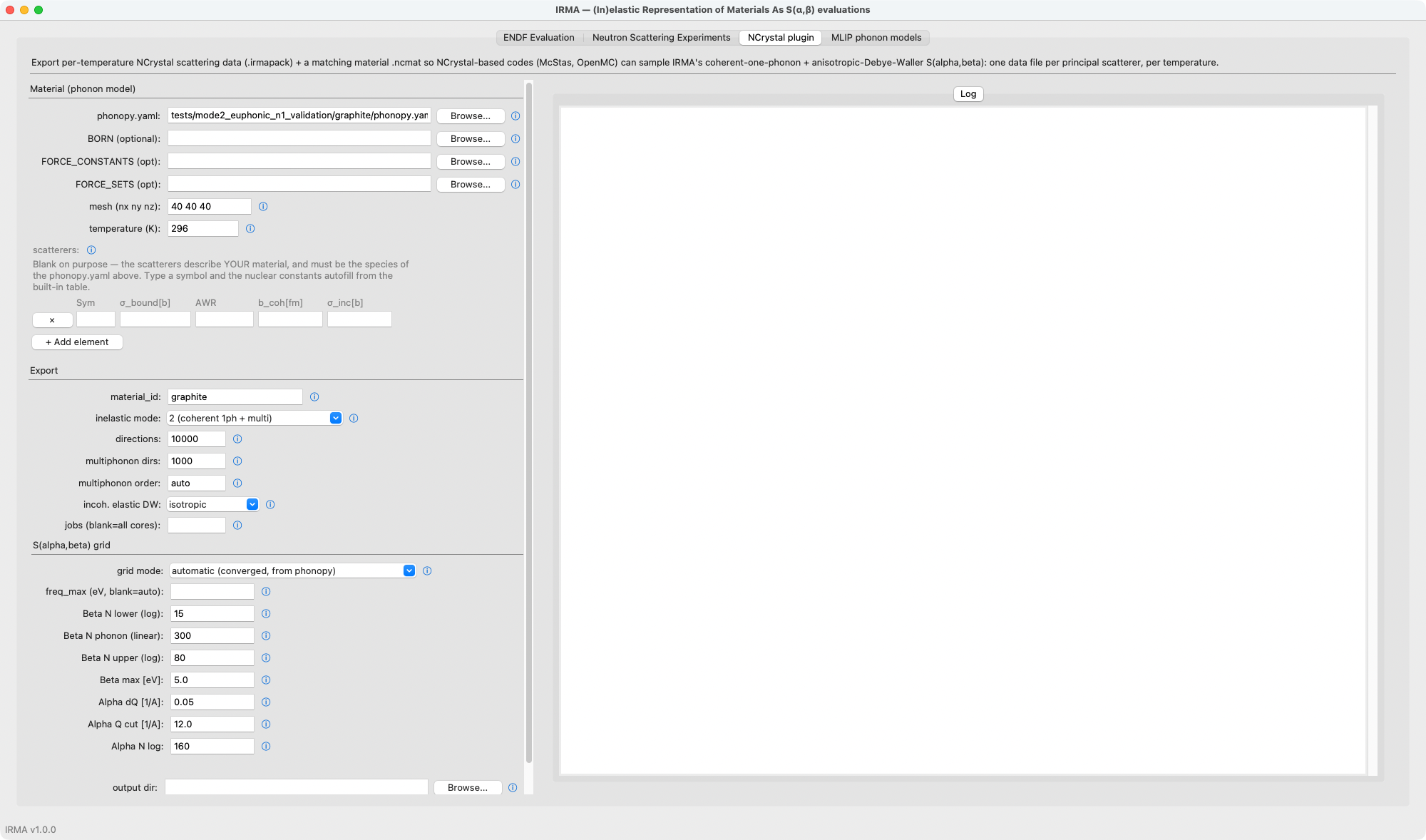
The NCrystal plugin tab is this tutorial as a form: the material and export sections mirror the YAML, each scatterer row fills its nuclear constants from the built-in table once you type the symbol, and the Log column streams the same export log.